If you need Windows employee monitoring software that goes beyond screenshots and idle time reports, OctoWatch gives you a single platform to monitor workstation activity, apply DLP controls, investigate insider risk, and support remote operations. It is built specifically for Windows environments, including standard workstations and Terminal Server/RDS deployments.
OctoWatch helps IT, security, compliance, operations, and management teams oversee office, remote, and hybrid users from a centralized Web Console. You can deploy it in Cloud or On-Premise mode, assign monitoring profiles by user or group, and use floating licenses based on active tracked users so coverage stays practical as staffing and usage change.
Windows employee monitoring for workstations and Terminal Server/RDS
OctoWatch is designed for organizations that need visibility into Windows endpoint activity without stitching together separate tools for monitoring, investigation, and policy enforcement. The Windows agent collects enabled activity channels on each workstation and sends them to the web console, where your team can review user activity, screenshots, video, alerts, and investigation details in one place.
“OctoWatch supports Windows workstations and Terminal Server/RDS environments through a centralized Web Console.”
That matters because your oversight problem usually is not limited to one office or one device type. U.S. labor data shows 22.4% of employed people teleworked or worked at home for pay in 2025, so for many teams, endpoint visibility now has to cover both in-office and remote Windows sessions.
“With 22.4% of employed people teleworking or working at home for pay in 2025, OctoWatch gives Windows teams one console for remote and on-site monitoring.”
OctoWatch is a strong fit when you need to see what happened on a Windows endpoint, who was involved, and whether the activity crossed a policy line. Instead of relying on basic time tracking alone, you get deeper user activity monitoring that supports security reviews, usage oversight, and incident investigation.
OctoWatch combines employee monitoring and DLP in one Windows platform
Many buyers do not want one product for monitoring and another for data loss prevention. OctoWatch combines both, which means your team can move from visibility to enforcement without changing systems or exporting data between tools.
For Windows monitoring and DLP, OctoWatch includes capabilities that map directly to common operational and security needs:
- Screenshots and video recording: Review what was on screen during a policy issue, investigation, or productivity review.
- User activity monitoring and keystroke capture: Reconstruct actions on a Windows device when you need more than a simple timeline.
- Device control and DLP rules: Notify or block selected website, file, and USB activity when computer-profile filtering is enabled.
- Remote control: Support users and verify issues on the endpoint without relying on a separate remote support product.
- Time tracking: Add operational context to activity data for attendance, workload, and utilization reviews.
- Investigation workflows and risk visibility: Give security and compliance teams a practical way to review suspicious endpoint behavior from the same console.
OctoWatch turns those features into faster investigations and tighter policy enforcement because the monitoring data and DLP controls are already connected. If a user copies files to removable media, accesses restricted content, or triggers another monitored event, your team can investigate from the same environment where rules and profiles are managed.
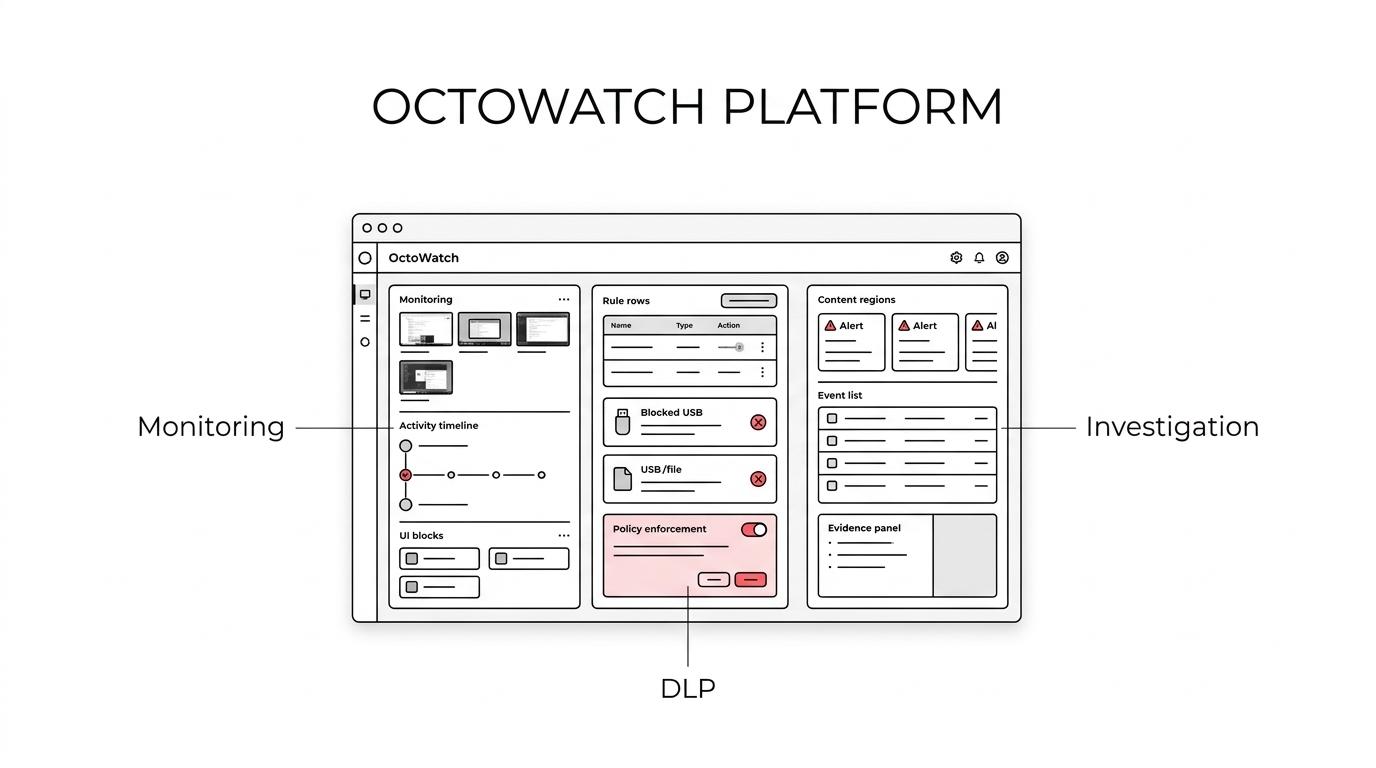
The product also supports role-based tuning through profiles assigned by user or group. That makes it easier to apply different monitoring and control levels to finance, customer support, contractors, administrators, or RDS users without forcing one blanket configuration across every Windows session.
Windows monitoring software for IT, security, and compliance teams
OctoWatch is not aimed at casual time tracking buyers who only need clock-in data. It fits teams that need operational visibility and security controls across managed Windows endpoints.
This is typically where the platform delivers the most value:
- IT teams that need to administer monitoring at scale across Windows PCs and Terminal Server/RDS sessions
- Security teams that need endpoint evidence, risk investigation support, and policy enforcement for insider risk scenarios
- Compliance teams that need documented oversight, activity review, and control over USB or file movement
- Operations and management teams that need reliable visibility into remote, hybrid, or office-based work patterns
OctoWatch is especially relevant when your environment includes remote users, shared servers, or a mix of departments with different policy requirements. Profile-based monitoring helps you tailor collection and enforcement by use case instead of treating every Windows user the same.
Cloud and On-Premise Windows employee monitoring with the same practical workflow
Deployment flexibility matters when monitoring data, privacy controls, and internal approvals are part of the buying decision. OctoWatch is available in both Cloud and On-Premise deployments, which gives your team a path whether you prefer hosted management or need to keep monitoring infrastructure inside your own environment.
“OctoWatch offers Cloud and On-Premise deployment plus a free 14-day trial for Windows employee monitoring and DLP.”
For buyers comparing rollout effort, this matters in two ways. First, your administrators work from a centralized Web Console in either model. Second, you can evaluate the product without a long procurement cycle by starting with the free 14-day trial.
OctoWatch also uses floating licenses based on active tracked users. That is useful when headcount shifts, contractors rotate in and out, or not every Windows account needs to be tracked at the same time. Instead of overcommitting to fixed per-seat coverage, you can align licensing more closely with actual monitored usage.
What OctoWatch improves in daily Windows endpoint oversight
OctoWatch helps reduce the gaps that appear when endpoint monitoring, DLP, and remote support are handled separately. In practice, that means less time switching tools, fewer blind spots during investigations, and better consistency when you need to apply policy across many Windows users.
For many organizations, the immediate gains are practical:
- clearer visibility into user activity on Windows devices
- better evidence for insider risk or misuse investigations
- stronger control over USB, file, and website activity
- simpler administration through one web-based console
- more realistic monitoring coverage for hybrid and remote workforces
OctoWatch also helps you avoid a common failure point in this category: buying a lightweight monitoring tool and then discovering you still need a separate DLP product, separate remote support workflow, and separate server coverage. Because OctoWatch combines monitoring and DLP in one platform, you can evaluate one stack instead of building your own from multiple point tools.
Policy, consent, and privacy safeguards for responsible employee monitoring
Serious buyers know Windows employee monitoring is not only a technical decision. It also touches policy, HR process, privacy, and legal review.
OctoWatch gives you the technical side of monitoring and control, but your internal rollout should still be tied to documented policy, notice, and approvals. Federal wiretap law places limits on intercepting electronic communications, and one commonly cited exception turns on prior consent. Regulatory and civil-rights guidance also shows that worker surveillance can raise privacy and discrimination concerns if organizations use monitoring carelessly or for decisions without proper safeguards.
That is why OctoWatch is best used as an oversight and investigation system with clear governance, not as an unchecked surveillance layer. Profile-based configuration, role-based deployment decisions, and defined internal access to the Web Console all help you align Windows monitoring with your own policy framework.
When OctoWatch is the right fit for your Windows environment
OctoWatch is a strong match when you have a Windows-heavy environment and need more than activity summaries. It works well when you need a combination of employee monitoring, DLP, device control, investigation support, and remote administration from one platform.
It is usually the right fit when:
- you manage Windows workstations or Terminal Server/RDS sessions
- you need monitoring plus DLP, not just time tracking
- you want Cloud or On-Premise deployment options
- you need centralized administration for remote, hybrid, and office users
- you prefer floating licenses based on active tracked users
- you want to trial the product before committing
If your evaluation list includes deployment control, Windows-specific coverage, policy enforcement, and practical investigation workflows, OctoWatch deserves a close look.
If you want to see how OctoWatch fits your Windows environment, start with the free 14-day trial and review the monitoring, DLP, and administration workflow against your own endpoints, user groups, and policy requirements.