OctoWatch provides workstation monitoring software for Windows environments where security, compliance, and operational oversight all matter at the same time. We help security teams review endpoint activity, investigate insider-risk events, enforce data handling rules, and keep a clear record of what happened on a workstation or in a Terminal Server or RDS session.
If you are evaluating workstation monitoring for a Windows estate, OctoWatch is built for that use case directly. Our platform combines employee monitoring and data loss prevention in one system, with Screenshots and video recording, video recording, user activity monitoring, device control, time tracking, remote control, and investigation workflows managed through a centralized Web Console in either Cloud or On-Premise deployment deployment.
Windows workstation monitoring for security teams that need evidence, control, and usable oversight
Security teams rarely buy workstation monitoring just to count hours. In practice, the need is broader: verify activity on sensitive endpoints, review policy exceptions, investigate suspicious behavior, and support audit or compliance reviews with actual workstation evidence.
That is where OctoWatch fits. OctoWatch records Windows workstation activity in a form your team can actually use, whether you are reviewing a single incident, monitoring a group of high-risk users, or applying the same controls across office, remote, and hybrid staff.
“OctoWatch covers Windows workstations and Windows Terminal Server/RDS environments from one centralized Web Console.”
For many buyers, this is already an established control pattern, not a fringe tool category. NIST ties insider-threat programs to user-activity monitoring, and workplace monitoring is already common enough that buyers usually need governance, scope, and operational clarity more than they need a basic explanation of the category.
OctoWatch captures the workstation activity security teams actually review
OctoWatch is designed for teams that need more than a simple time tracker. The platform gives you visibility into what happened on a Windows endpoint, who did it, and how to review it centrally without piecing together separate monitoring and DLP products.
That matters when an investigation depends on more than a log line. Screenshots and video recording help your team validate context, user activity monitoring shows application and website usage, and device control supports policy enforcement around removable media and other data movement risks.
The core capabilities typically evaluated by security and IT teams include:
- Screenshots and video recording: Capture visual evidence of workstation activity for investigations, policy review, and audit support.
- User activity monitoring: Review application usage, website activity, and workstation behavior from a centralized Web Console.
- Device control and DLP controls: Enforce policies that reduce the risk of unauthorized data transfer from Windows endpoints.
- Time tracking and attendance visibility: Add operational oversight where security and management teams need verified workstation usage data.
- Remote control: Investigate or respond to workstation issues without switching to a separate tool.
- Investigation workflows: Centralize review, follow-up, and evidence gathering instead of managing screenshots, activity data, and controls in separate systems.
OctoWatch combines these capabilities in one platform, which simplifies day-to-day administration for teams that would otherwise have to integrate several endpoint tools just to get acceptable visibility.
“OctoWatch combines employee monitoring and DLP in one Windows-focused platform.”
Because the platform is Windows-focused, the workflow stays aligned to the environments many security teams already manage. That includes standard workstations as well as Terminal Server and RDS deployments where shared-session visibility can be difficult to handle cleanly with tools built for other endpoint models.
Workstation monitoring software that also reduces data leakage risk
Many workstation monitoring products stop at observation. OctoWatch goes further by combining monitoring with data loss prevention, which changes the value for security teams.
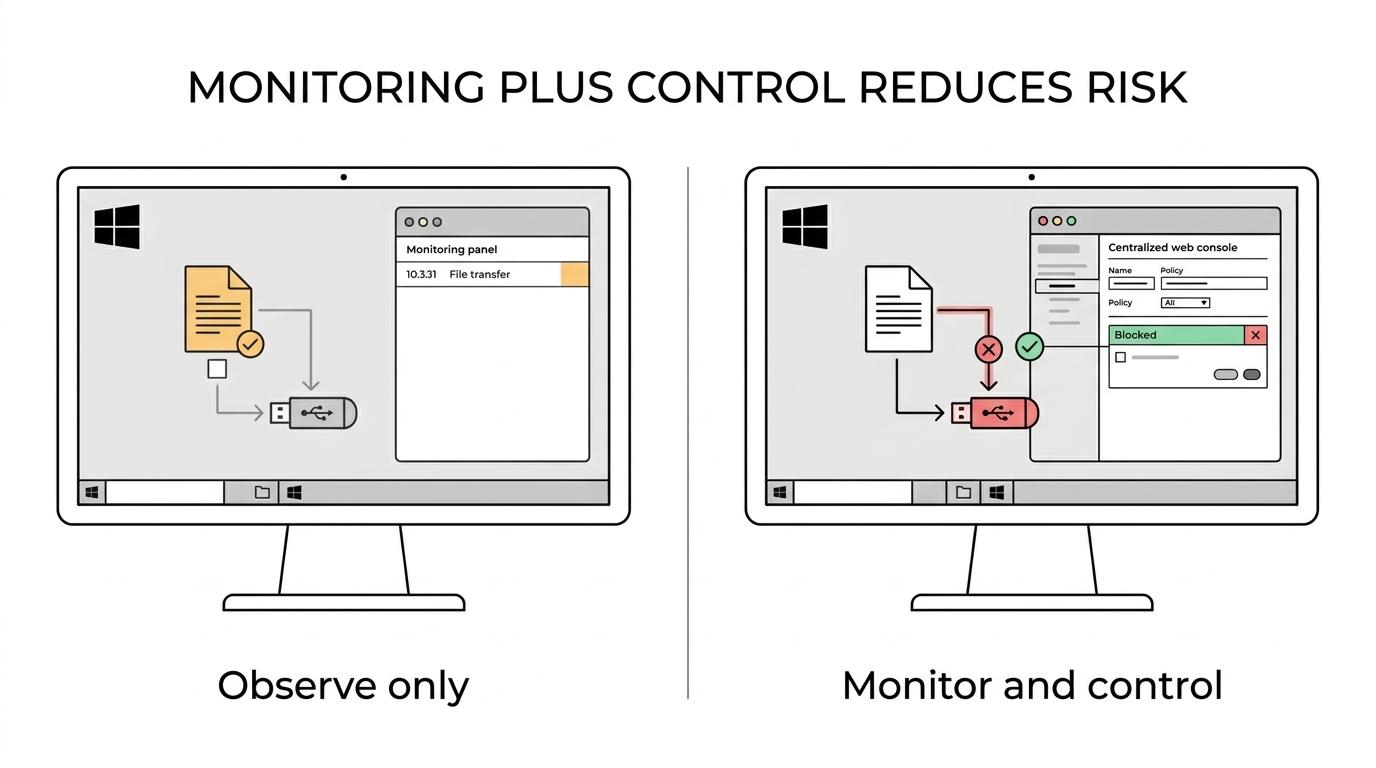
Instead of only seeing that a user accessed a file or spent time in an application, you can pair that visibility with controls that help enforce security and usage policies. For insider-risk reviews, policy violations, or sensitive data handling concerns, that means less guesswork and a clearer chain from observed behavior to follow-up action.
This is particularly useful when your team is trying to answer questions such as:
- Was a suspicious action isolated or part of a longer pattern on the workstation?
- Did the user interact with websites, applications, or devices that violate policy?
- Do we need evidence for an HR, legal, compliance, or internal security review?
- Can we enforce endpoint rules without adding another standalone DLP product?
OctoWatch gives security and compliance teams a more direct operating model: monitor the endpoint, review evidence centrally, and apply controls through the same system.
Cloud or On-Premise deployment for Windows monitoring programs
Deployment flexibility matters when workstation monitoring touches security, compliance, and employee oversight. Some organizations want fast rollout with minimal infrastructure. Others need tighter control over where systems are hosted and how they are operated internally.
OctoWatch supports both Cloud and On-Premise deployments with a similar workflow, so your team does not have to choose between usability and infrastructure preference. If you want a faster evaluation path, the Cloud trial uses only the Grabber on endpoints while the Web Console is hosted at app.octowatchdlp.com.
“OctoWatch offers Cloud and On-Premise deployments, and the Cloud trial runs with only the endpoint Grabber plus the hosted Web Console.”
That flexibility is useful in mixed environments. Security teams often have one set of requirements for corporate office workstations, another for remote users, and another for controlled server-based sessions. OctoWatch gives you one Windows monitoring approach across those scenarios instead of forcing separate tools or inconsistent evidence handling.
Centralized Web Console for investigations, rules, and day-to-day administration
A workstation monitoring product becomes difficult to manage quickly if every review requires endpoint-by-endpoint access or scattered exports. OctoWatch keeps administration centralized through its Web Console.
From the Web Console, your team can monitor activity, review records, manage rules, and handle investigations in one place. That reduces operational friction for security teams that need to move from alert or suspicion to evidence review without wasting time moving between disconnected systems.
For buyers comparing tools, this affects more than convenience. A centralized console can make policy enforcement more consistent, speed up investigations, and lower the effort required to manage users across distributed Windows estates.
Floating licenses based on active tracked users
Licensing can become expensive or inefficient in environments with shared systems, changing headcount, temporary users, or uneven monitoring scope. OctoWatch uses floating licenses based on active tracked users rather than a simple computer count.
That model can be easier to justify operationally, especially in Terminal Server, RDS, and other Windows environments where a device-based license model does not always reflect how the system is actually used.
“OctoWatch floating licenses count active tracked users, not computers.”
For security teams, this helps align cost with actual monitored usage. You are not forced into the same licensing logic you would use for a fixed one-user-one-device estate if that is not how your environment works.
Where OctoWatch is a strong fit for workstation monitoring
OctoWatch is a strong fit when your organization needs workstation monitoring for security and operational reasons, not just simple attendance reporting.
Teams usually get the most value from OctoWatch when they need:
- Windows-first coverage: Your endpoints are Windows workstations, Windows Terminal Server, or RDS sessions.
- Monitoring plus DLP: You want visibility and policy enforcement in the same platform.
- Centralized investigation workflows: Security, IT, compliance, or management teams need a shared review point in a Web Console.
- Deployment choice: You need Cloud for speed, On-Premise for internal control, or the flexibility to evaluate both.
- Practical licensing: Active tracked user licensing fits your environment better than rigid per-device licensing.
OctoWatch is especially relevant for organizations managing office, remote, and hybrid users. U.S. labor data continues to show telework at meaningful scale, and endpoint visibility remains important when work is spread across corporate offices, home offices, and shared server-based sessions.
It is also a practical choice when governance matters. Pew research shows workplace computer monitoring is already common, and security teams increasingly need tools that support formal policy enforcement, documented reviews, and defensible investigation processes instead of ad hoc spot checks.
Start with a 14-day OctoWatch trial on your Windows endpoints
If you are comparing workstation monitoring software for a Windows environment, the fastest way to evaluate fit is to test the actual workflow your security team will use. OctoWatch offers a free 14-day trial so you can review monitoring depth, deployment fit, Web Console usability, and licensing practicality in your own environment.
Use the trial to answer the questions that matter most to your team: how easily you can review endpoint activity, how well the platform supports insider-risk or DLP workflows, and whether one Windows-focused system can replace a more fragmented toolset.
If that is what you need, start an OctoWatch trial and evaluate workstation monitoring with the controls, evidence, and deployment options your security team actually works with.