
Download Employee Monitoring Software for Windows
Sign up for a free OctoWatch trial, install the Grabber on Windows PCs or RDS hosts, and see activity in the Web Console within 5-10 minutes. Cloud and On-Premise deliver the same monitoring coverage—the only difference is where data is stored.
No credit card required. Windows and RDS supported. Cloud or On-Premise deployment.
Already have an account? Log in to the Web Console.
Start your trial with the right deployment path
Use this page to start a trial, install the Grabber, and confirm data in the Web Console. For full rollout instructions, see How it works; for licensing, use Pricing.
Trial period
14 days of full trial access
Trial users
Up to 15 active tracked users
Platform
Windows workstations and RDS hosts
Deployment
Cloud or On-Premise with the same Grabber
How to start in three steps
OctoWatch is built for a fast first run: register, install the Grabber, and confirm activity in the Web Console. For self-hosted deployments, the same product keeps data on your own Server and SQL environment.
1
Create your account
Start at app.octowatchdlp.com/register/. The account gives you immediate access to the Cloud trial and to the Grabber download page inside the product.
2
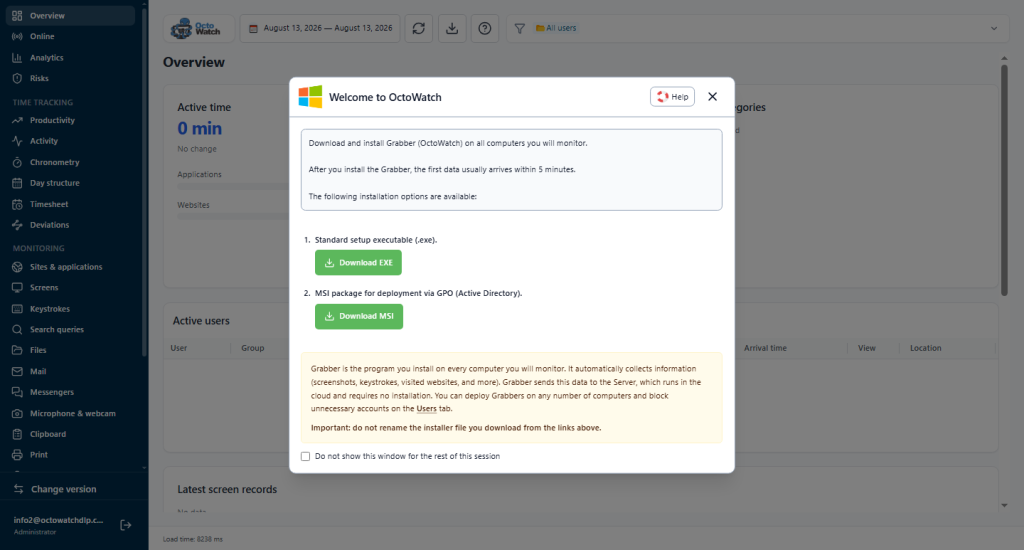
Install the Grabber
Deploy the Windows Grabber manually or roll it out with AD GPO, the Installation Utility, or PsTools. On a standard Cloud trial, the Grabber is the only component you install on each monitored PC or RDS host.
3
Open the Web Console
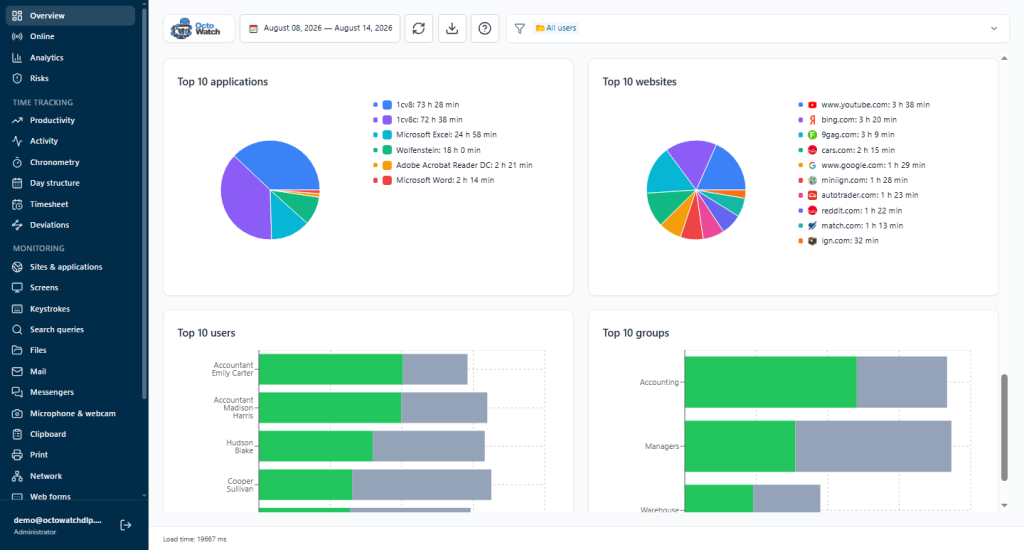
Return to the Web Console, wait 5-10 minutes, and confirm that users appear in Overview and Users. From there you can move into Activity, Live, Risks, Screens, and Reports. Web Console operators are unlimited and do not consume licenses.
What the first successful trial should show
A successful pilot shows real Windows user activity in the Web Console within minutes. Once the Grabber connects, operators can verify online users, activity totals, screenshots, risks, and early productivity signals—with no extra console licenses.
If you need the full rollout sequence with defaults, profiles, and operator permissions, continue to How OctoWatch Works.
What IT teams usually confirm in the first week
Before procurement or a broader rollout, most IT teams work through a few operational questions during the pilot.
Deployment control
Can we deploy the Grabber with our standard Windows rollout tools without disrupting pilot machines?
Policy defaults
Do the default settings, rules, and timetable fit the pilot as-is, or do we need narrower profiles before wider rollout?
Evidence and reporting
Are screenshots, risks, and scheduled reports enough for operations, investigations, or compliance review in our environment?
What you can evaluate in the trial
Use the trial to validate workforce visibility and DLP depth before you commit to a full rollout.
Visibility
Activity and productivity
See work time, idle patterns, attendance, and categorized productivity in the same trial account. Productivity Analytics
Live control
Live view and remote control
Confirm that monitored Windows sessions can be reviewed live when policy and ports allow it. Live View & Remote Control
Evidence
Screenshots and videos
Review visual proof for sessions, windows, and user timelines as part of the trial run. Screenshots & Video Recording
DLP
Rules, alerts, and Risks
Test rule hits, alerts, and the Risks workflow before you buy—no product switch required. DLP Rules & Alerts and Insider Risk Management
Apps and web
Application and website monitoring
Review websites, search, launched apps, and related productivity categories from the same user session. Application & Website Monitoring
Reporting
Reports and exports
Use built-in report delivery and historical analytics to evaluate usefulness before buying licenses. Reports & Analytics
Same product, different deployment
Choose Cloud for the fastest trial start. Choose On-Premise when data custody, internal SQL, or deployment policy require infrastructure you control.
Cloud trial
Fastest route to first data
- Create the account at
app.octowatchdlp.com/register/ - Install the Grabber only
- Use the Web Console from anywhere
- Best path for first evaluation and short onboarding
On-Premise
Your Server, your SQL, your storage
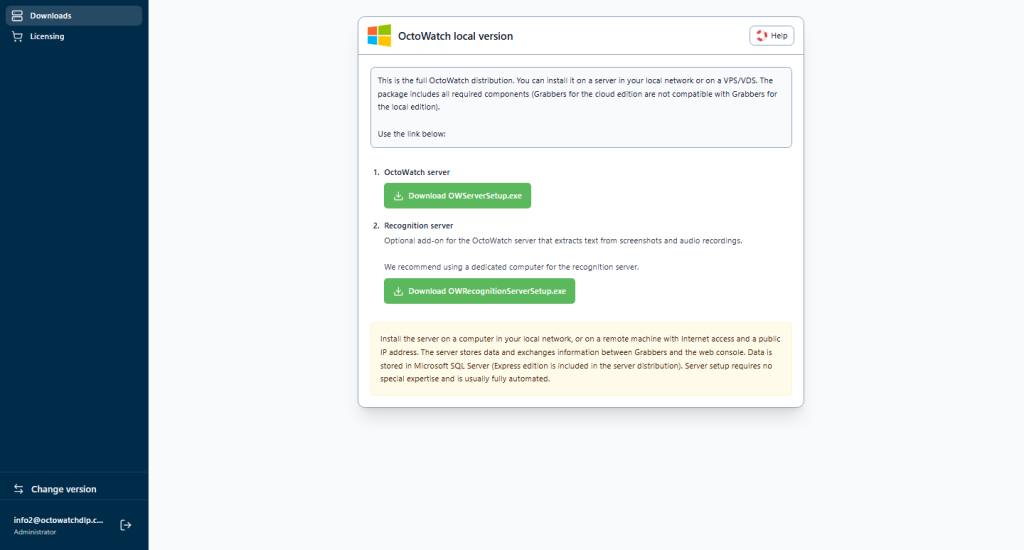
- Install Server and Microsoft SQL on your network
- Configure users and profiles in the Admin Console
- Deploy Grabbers after the server is ready
- Best path for in-house data control and regulated environments
System requirements and trial boundaries
Set clear expectations before rollout. OctoWatch is a Windows employee monitoring and DLP platform—not a multi-OS time tracker.
Grabber requirements
Windows Vista and newer. Typical network usage is about 200-400 MB per day per tracked computer, depending on the enabled capture profile.
RDS and terminal servers
OctoWatch supports per-session monitoring on Windows terminal servers and RDS hosts. For the deployment model, see Terminal Server Monitoring.
Not part of this trial path
This trial path is built for Windows workstations, laptops, and RDS environments. It is not the right fit for Mac, Linux, Android, payroll, or field GPS workflows.
Trust, support, and data custody
Cloud data is stored in encrypted distributed infrastructure in the US. On-Premise keeps monitoring data on your own server and only needs outbound access for license activation. Web Console operators do not consume licenses, and support is available at support@octowatchdlp.com, typically within about one hour.
Review Security & Compliance, Privacy Policy, License Agreement, and the User Guide before rollout.
Frequently asked questions
How do I download OctoWatch?
Create your account at app.octowatchdlp.com/register/, then use the in-product download flow for the Grabber or continue to the On-Premise route if you need your own Server and SQL stack.
Is the trial free and what are the limits?
Yes. The OctoWatch trial is free for 14 days and includes up to 15 active tracked users so you can validate monitoring and DLP workflows before licensing.
Do I need a credit card to start?
No credit card is required to create the trial account and start the Cloud deployment path.
Can I monitor terminal server sessions?
Yes. OctoWatch supports Windows RDS and terminal server monitoring on a per-session basis. See Terminal Server Monitoring for the deployment model.
What is the difference between Cloud and On-Premise?
Cloud uses the Web Console at app.octowatchdlp.com and requires only the Grabber on monitored endpoints. On-Premise stores data on your own server and SQL environment and adds the Admin Console to the rollout path.
Where can I get help with installation?
Start with How it works and the User Guide, or email support@octowatchdlp.com if you need rollout help.
By starting a trial, you confirm that you will deploy monitoring only where you are authorized to do so, in accordance with company policy and applicable law.