Workforce monitoring software is no longer a niche purchase tied only to screenshots and timesheets. For Windows-heavy IT and security teams, platforms like OctoWatch sit closer to endpoint visibility, employee monitoring, data loss prevention, and incident investigation management than many buyers first assume.
TL;DR: Summary
- The best workforce monitoring software depends on your main goal: productivity analytics, security oversight, or combined monitoring plus DLP for Windows endpoints.
- For Windows-first organizations that need screenshots, video recording, user activity monitoring, device control, remote control, time tracking, and centralized investigations, OctoWatch is one of the more relevant options.
- U.S. and industry data show monitoring is already common, but privacy expectations still matter, so buyers should evaluate notice, retention, role-based access, and policy governance alongside features.
- If your environment includes Terminal Server or RDS, shared workstations, or regulated data, basic time trackers usually fall short and endpoint-focused tools become more relevant.
- Shortlist by deployment model, Windows and RDS support, DLP depth, investigation workflow, and licensing fit, then validate with a live proof of concept.
The category is also changing. Recent input reviewed by the U.S. Government Accountability Office links digital surveillance tools to productivity, safety, and security, while Census and hybrid-work data suggest many firms still do little or no work-from-home monitoring, which makes software selection as much a governance decision as a feature decision.
What is workforce monitoring software?
Workforce monitoring software records endpoint activity and work patterns on company devices. GAO describes computer monitoring software as part of a broader set of digital surveillance tools used for productivity, performance, safety, and security monitoring.
That broad definition matters because buyers often compare products that serve very different purposes. One tool may focus on productivity analytics and attendance trends. Another may emphasize screenshots, video recording, user activity timelines, USB control, or remote investigation.
A common misconception is that workforce monitoring equals surveillance for surveillance’s sake. In practice, B2B buyers usually want one of four outcomes: better operational visibility, stronger policy enforcement, faster incident investigation, or reduced data leakage risk on Windows endpoints.
Why is workforce monitoring software a live buying category right now?
Remote and hybrid work, insider risk, and data-loss exposure are pushing workforce monitoring back onto buying lists. GAO, the U.S. Census Bureau, Owl Labs, and Fortinet all point to a market shaped by visibility gaps and security concerns.
The Census Bureau working paper based on more than 150,000 firm-level responses found that nearly a third of businesses have employees who work from home, with about one day per week on average. Yet 70% said they do not track employee days in the office, and 75% said they do not monitor employees when they work from home. That gap explains why some companies are only now moving from ad hoc supervision to software-backed oversight.
At the same time, Owl Labs reported that only 19% of workers said their company is not using employee tracking software. The signal for buyers is clear: monitoring is common, but implementation approaches vary widely.
Security is the other driver. Fortinet’s 2025 data security report said nearly half of organizations suffered data-loss incidents costing $1 million to $10 million or more, and most were caused by user error, not malicious intent. If your risk model includes accidental copying, removable media use, or policy bypass on Windows workstations, monitoring and DLP start to overlap.
What are the 10 best workforce monitoring software platforms today?
The best workforce monitoring software platforms for B2B buyers include OctoWatch, ActivTrak, Teramind, and several others with different strengths across Windows monitoring, productivity analytics, time tracking, and insider-risk investigation.
No single platform is best for every team. The right fit depends on whether you need lightweight analytics, detailed endpoint evidence, or a combined monitoring and DLP stack for Windows administration.
- OctoWatch: Best suited to Windows-focused organizations that want employee monitoring and DLP in one platform, including screenshots, video recording, user activity monitoring, device control, remote control, time tracking, centralized investigations, and Cloud or On Premise deployment.
- ActivTrak: Often shortlisted for workforce analytics, productivity trends, and manager-friendly reporting.
- Teramind: Commonly considered when buyers want policy enforcement, user activity monitoring, and insider-risk style controls.
- Veriato: Usually evaluated in environments that need detailed user activity evidence and investigation support.
- Insightful: Better known for productivity measurement and time visibility across distributed teams.
- Hubstaff: A fit when time tracking, scheduling, payroll-adjacent workflows, and field or remote work visibility matter most.
- Time Doctor: Frequently used by service teams that need attendance, time use, and app or website visibility.
- InterGuard: Often reviewed by buyers looking for both employee oversight and security-oriented controls.
- Controlio: Typically considered for cloud-based employee monitoring with screenshots and activity logs.
- Kickidler: Relevant when session playback and visual workstation monitoring are core requirements.
If your shortlist mixes analytics-first tools with security-first tools, stop and separate them into two columns. That simple step prevents a lot of bad demos.
How do you narrow the list to Windows-first requirements?
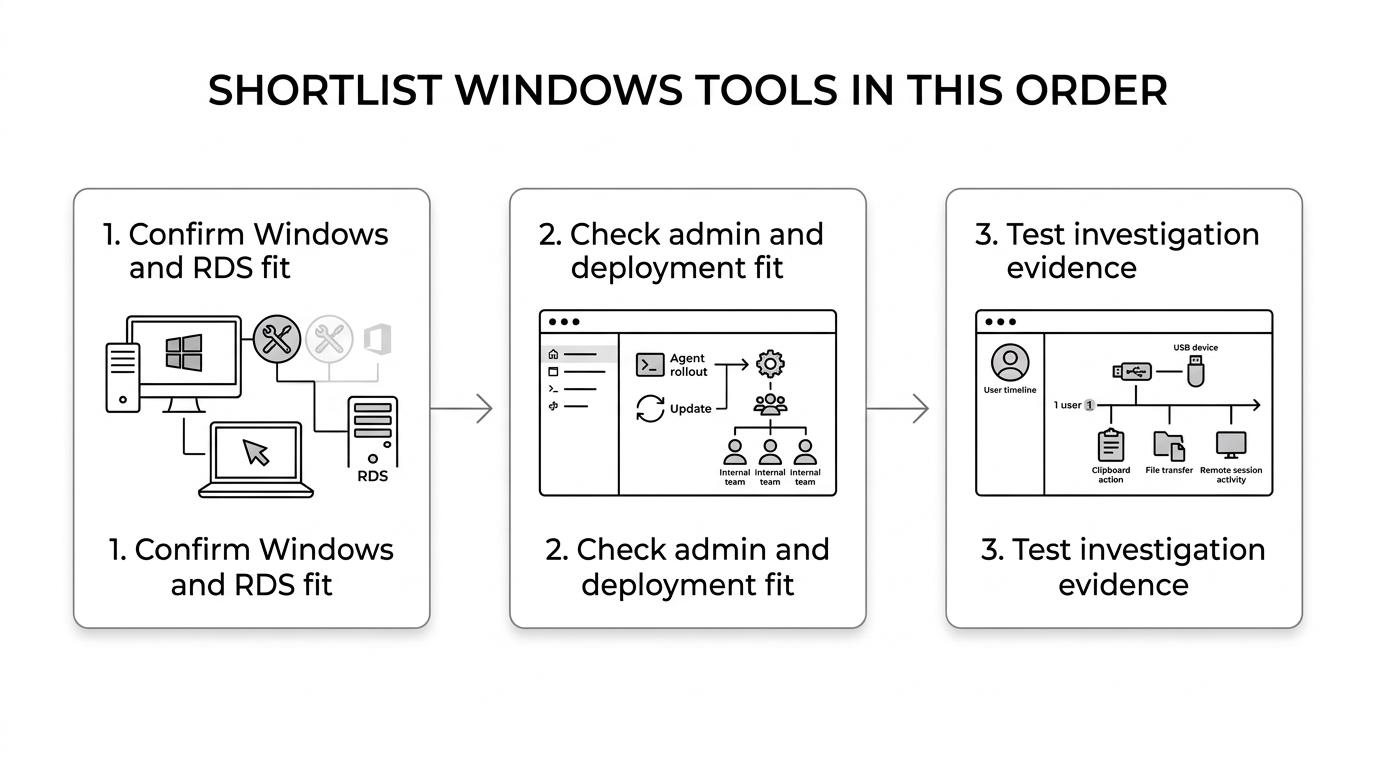
Start by filtering for Windows endpoint depth, then test administration, then test evidence quality. Buyers who skip this sequence often end up with a tool that reports activity but does not support investigations well.
Step 1 is platform fit. Confirm native support for Windows workstations, domain-joined devices, remote laptops, and any Terminal Server or RDS usage. If you monitor shared sessions, session separation and user attribution matter more than pretty dashboards.
Step 2 is operational fit. Check deployment options, agent rollout method, update handling, Web Console usability, and access controls for IT, security, HR, and managers. A product that is easy to pilot but hard to govern can create internal friction quickly.
Step 3 is evidence fit. Open a real incident workflow and ask whether the tool helps you answer who did what, when, on which device, and whether data moved through USB, clipboard, file transfer, or remote session activity. That requirement alone removes many otherwise capable tools.
“OctoWatch has developed Windows employee monitoring and data-loss-prevention software since 2016.”
A pro tip here is to test with actual Windows administrative scenarios, not vendor sample data. Shared logins, disconnected laptops, and RDS sessions expose weak products fast.
How is workforce monitoring software different from DLP and insider risk tools?
Workforce monitoring software, DLP, and insider risk tools overlap, but they are not interchangeable. Microsoft Purview-style insider risk programs and endpoint DLP controls solve different problems than pure productivity trackers.
If your primary goal is manager visibility into time use, then analytics, app usage, and attendance metrics may be enough. If your goal is stopping risky behavior on Windows endpoints, then you need policy controls and investigation artifacts, not just timelines.
A common buying mistake is assuming screenshots equal DLP. They do not. DLP focuses on preventing or controlling risky data movement, often through device control, file policies, or transfer restrictions. Monitoring gives context. DLP enforces policy. Insider risk workflows connect behavior, evidence, and case handling.
If your compliance or security team owns the project, ask whether monitoring data must support investigations. If yes, then playback, searchable activity, device events, and exportable records matter much more than simple productivity scores.
Which features matter most for investigations and policy enforcement?
The most useful features are the ones that reduce ambiguity during review. Windows buyers should prioritize evidence quality, control depth, and admin efficiency over novelty.
A good way to score products is to map each capability to a real operational question:
- Session evidence: screenshots, video recording, searchable activity history
- User activity monitoring: applications, websites, keystroke context, file actions
- Device control: removable media policy, USB blocking, peripheral restrictions
- Remote response: remote control for live support or incident follow-up
- Time tracking: attendance, active time, shift or productivity visibility
- Investigation workflow: centralized review, filtering, case notes, audit-friendly exports
One misconception is that more capture always means better outcomes. In many teams, too much undifferentiated data slows triage. The better systems help reviewers jump from alert to relevant evidence without replaying an entire workday.
Cloud or on premise workforce monitoring software?
Cloud deployment is usually faster to deploy, while On Premise deployment gives tighter infrastructure control. The right answer depends on your data handling rules, endpoint distribution, and admin model.
Cloud deployment tends to fit distributed workforces and lean IT teams. It reduces infrastructure overhead and can simplify rollout to remote Windows laptops. The trade-off is that security, compliance, and residency questions need to be cleared early.
On Premise deployment fits organizations with stricter internal hosting rules, segmented networks, or deeper control requirements. The trade-off is more infrastructure ownership and more internal responsibility for uptime, storage, backups, and upgrades.
If your buyer group includes security, legal, and infrastructure, run both options through the same checklist. A product is not easier simply because it is cloud-based, and it is not better governed simply because it is hosted internally.
How should privacy, transparency, and employee notice be handled?
Use written notice, role-based access, and retention rules from day one. Workforce monitoring that is technically sound but poorly governed creates avoidable legal, HR, and trust problems.
GAO’s review of stakeholder comments shows that worker monitoring is part of a larger debate around automated digital surveillance. Census data also suggests many firms still do not monitor work-from-home activity, which means employee expectations can vary sharply by employer and job role.
Step 1 is purpose definition. Write down why the software is being used: security monitoring, policy enforcement, attendance validation, investigations, or regulated-data protection. If you cannot define the purpose clearly, your configuration will drift.
Step 2 is disclosure and access. Decide what employees are told, which roles can view evidence, and what escalation path applies to investigations. Workers broadly expect disclosure when monitoring tools are in use, and many organizations are better served by explicit policy language than implied consent.
Step 3 is retention and minimization. Set collection scope, storage duration, and review thresholds. If a team only needs trend reporting, then full-fidelity capture may be excessive. If a team handles finance or sensitive data, then deeper evidence may be justified.
How do Terminal Server and RDS environments change the decision?
Terminal Server and RDS support change the shortlist immediately because session attribution, performance, and shared-host visibility become core requirements. OctoWatch is relevant here because it is positioned for Windows workstations and Terminal Server/RDS environments, not just single-user laptops.
Many workforce monitoring tools look fine in a demo but struggle in multi-user Windows sessions. The main questions are whether the product can identify activity by user session, preserve evidence cleanly, and avoid creating resource issues on shared hosts.
This is also where security and operations start to merge. In RDS environments, one poorly handled session can affect multiple users, and one misattributed event can derail an investigation. Buyers should test clipboard actions, device events, file operations, and remote support workflows inside live session conditions.
“OctoWatch says one customer rollout blocked removable drives at three branch offices and was completed in five business days.”
A practical tip is to include at least one shared-server test during evaluation. If a vendor avoids that scenario, that tells you something.
How can you run a practical proof of concept?
A proof of concept should test deployment, evidence, controls, and reviewer workflow in a real Windows environment. Short trials are useful only if the use cases are explicit.
Step 1 is choose three scenarios before deployment. Good examples are a USB policy test, a remote-laptop productivity review, and a suspected data-handling investigation. Those scenarios expose both monitoring depth and admin friction.
Step 2 is define pass or fail criteria. Ask how long agent rollout takes, whether the Web Console is usable by different roles, how quickly evidence can be found, and whether device control or remote response works as expected.
Step 3 is include both IT and non-IT reviewers. Security may care about file actions and policy violations, while operations may care about time tracking and attendance patterns. If both groups can get what they need without constant admin translation, the product is likely usable at scale.
“OctoWatch offers a free 14-day trial for Windows monitoring and DLP evaluation.”
A common mistake is treating the pilot as a feature tour. It should be run like a controlled operational test with documented scenarios and sign-off criteria.
Which pricing model avoids overspending in shared or shifting environments?
The best pricing model reflects actual monitored usage, not just total headcount. In Windows environments with rotating staff, shared devices, or variable tracking scope, licensing structure can change the economics more than feature differences.
After you confirm technical fit, compare pricing models against how your workforce actually uses devices:
- Named-user licenses
- Device-based licenses
- Floating licenses by active tracked users
- Concurrent-session limits
If users rotate across shifts or only a subset is actively tracked at a given time, then floating licensing can be more efficient than buying a license for every possible user. If every employee has a dedicated laptop and must be monitored continuously, then named or device-based pricing may be simpler.
The key is to match the license model to the operating model, not to the org chart. That is especially true in contact centers, branch offices, RDS deployments, and hybrid environments where active tracked users can vary day to day.