

When your IT team needs information security software for Windows endpoints, basic time tracking or isolated DLP tools usually leave gaps. OctoWatch brings employee monitoring and data loss prevention into one Windows-focused platform, so you can record workstation activity, enforce security and usage policies, investigate insider risk, and manage productivity from a centralized Web Console.
OctoWatch is built for IT, security, operations, compliance, and management teams that oversee Windows workstations and Terminal Server or RDS environments across office, remote, and hybrid workforces. If you need clearer visibility into what is happening on endpoints, who touched sensitive data, and whether policy controls are being followed, we give you one system to monitor, review, and respond.
OctoWatch information security software for Windows endpoint visibility and DLP control
OctoWatch helps you see more than login times and app names. Our platform can record activity, applications, websites, screens, video, keystrokes, files, email and IM, clipboard, prints, webcam, microphone, and network data based on the Settings Profile you choose, giving your team detailed evidence when a policy exception or suspected data loss event needs review.
“OctoWatch records apps, websites, screens, video, keystrokes, files, email and IM, clipboard, prints, webcam, microphone, and network data through selectable Settings Profiles.”
That depth matters when you are trying to protect customer information, investigate misuse, or verify whether a risky action actually happened on a Windows machine. OctoWatch combines monitoring with DLP controls, which is a strong fit for organizations that need to watch data in use, data in motion, and data at rest through centralized management.
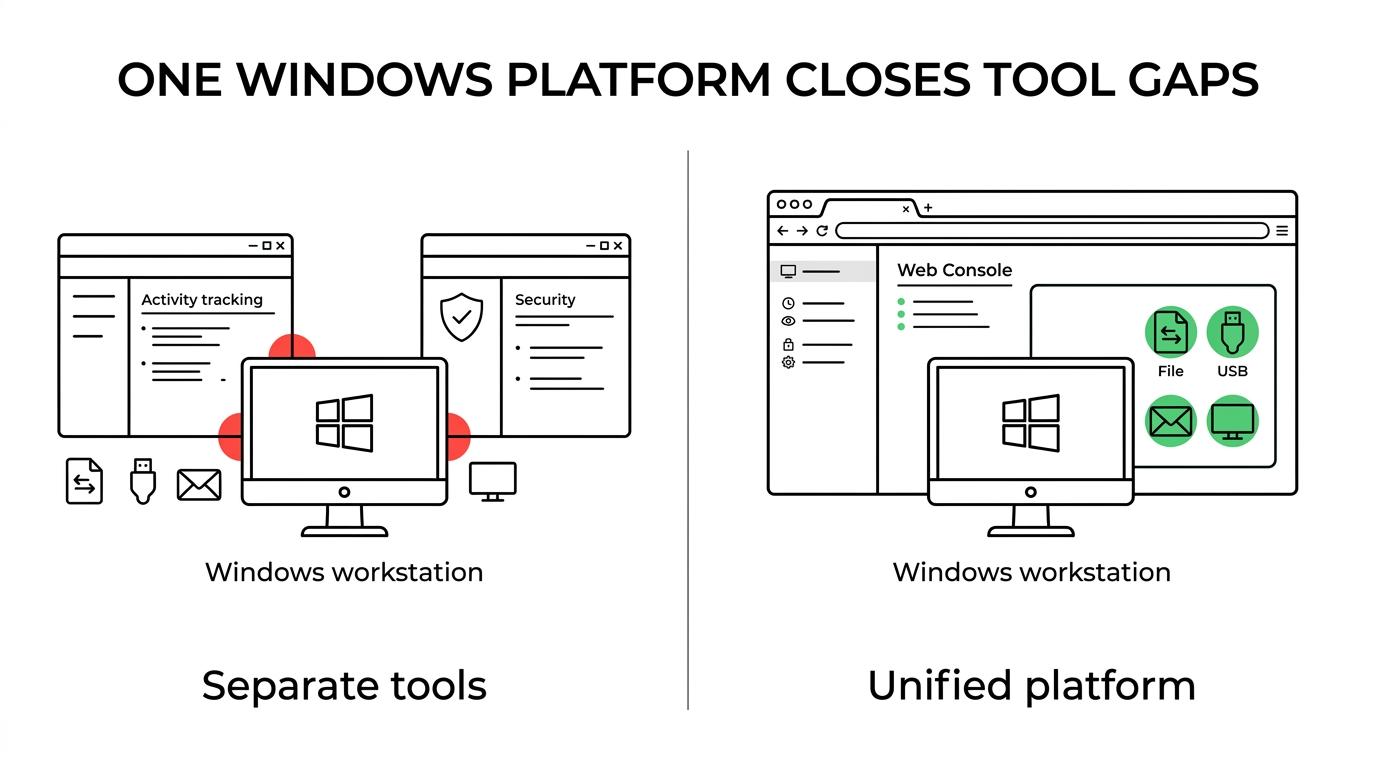
OctoWatch keeps those controls in one Web Console, so your team can work from a single place for monitoring, rule management, and investigations instead of juggling separate tools for endpoint observation and policy enforcement.
You can use OctoWatch information security software to monitor and control events such as:
- User activity: application usage, website visits, screenshots, video, and live workstation visibility
- Data movement: file operations, USB activity, print jobs, clipboard use, email, IM, and network-related activity
- Investigation detail: keystrokes, audit trails, and supporting evidence for insider risk reviews and policy enforcement
OctoWatch supports continuous monitoring and investigation workflows for IT and compliance teams
Many security frameworks and regulated environments expect more than a written policy. They expect logging, ongoing review, and the ability to respond when suspicious behavior appears. OctoWatch gives Windows-heavy teams a practical way to support continuous monitoring with endpoint logs, alerts, and investigation data that can feed your internal security program.
“OctoWatch combines employee monitoring and data loss prevention in one Windows-focused system for continuous endpoint monitoring and investigations.”
If your team works against expectations shaped by NIST logging guidance or the FTC Safeguards Rule, OctoWatch can help you gather the activity records and endpoint evidence those programs often rely on. We do not replace your legal, compliance, or policy work, but we do make it easier to observe user activity, review incidents, and retain the records your team decides to collect.
OctoWatch is especially useful when you need to answer specific questions fast: which user accessed a file, whether data was copied to USB, what was printed, what was sent through email or messaging, or what appeared on screen during the event window. Live view and remote control also help IT teams verify an issue in real time before it turns into a larger incident.
Because OctoWatch is centralized, your team can define rules, review alerts, and investigate from the same environment. That cuts time spent switching tools and makes it easier to keep monitoring practices consistent across offices, remote staff, and shared Windows server sessions.
Cloud and On-Premise information security software with the OctoWatch Web Console
OctoWatch gives you deployment flexibility without forcing your team into different operating models. We offer both Cloud and On-Premise deployments, and version 7 made the Web Console available to both, so your day-to-day workflow stays familiar whether you want hosted convenience or customer-controlled infrastructure.
“OctoWatch Version 7 made the Web Console available to both Cloud and On-Premise deployments.”
That matters when your buying process includes security review, data residency discussions, or phased rollout plans. You can start where your organization is comfortable and still use the centralized Web Console for monitoring, rules, and investigations.
OctoWatch also makes licensing easier to align with real usage. Floating licenses are counted by active tracked users, while Web Console operators are unlimited and do not consume a license, which helps when multiple IT, security, or compliance stakeholders need access to review data and manage incidents.
Here is the practical difference between the two deployment options:
| Deployment | What OctoWatch provides | What your team gains |
|---|---|---|
| Cloud | Hosted Web Console with a fast setup path that can start with Grabber deployment on endpoints | Faster evaluation, simpler rollout for remote or hybrid teams, and a similar workflow to on-premise |
| On-Premise | Deployment on Windows with Microsoft SQL Server, with the Server, Admin Console, and Grabbers installed in your environment | Control over where DLP data is stored and managed, which is useful for internal hosting and data-sensitive environments |
On-premise deployment keeps the Grabbers, Web Console, and DLP data with your organization, stored where you host it. For teams that need tighter infrastructure control while still monitoring file, USB, print, email, and IM activity, OctoWatch gives you that option without losing the centralized investigation model.
Why OctoWatch is a strong fit for Windows-heavy, RDS, and data-sensitive environments
Some information security platforms try to be everything to every endpoint. OctoWatch is different. We are specifically focused on Windows environments, including Terminal Server and RDS deployments, which makes the platform relevant for organizations that need visibility into real workstation behavior across standard desktops and shared session environments.
“OctoWatch supports Windows workstations and Terminal Server or RDS environments through a centralized Web Console in Cloud and On-Premise deployments.”
OctoWatch is also a practical choice when your team wants one product to cover monitoring, DLP enforcement, investigations, and productivity oversight. Instead of buying one tool for time tracking, another for insider risk, and another for endpoint DLP, you can manage those needs inside one Windows-centered system.
OctoWatch is often the right fit when you need to:
- Protect sensitive information on Windows endpoints: with controls and logs around files, USB, print, clipboard, email, IM, and network activity
- Investigate insider risk with evidence: using screenshots, video, keystrokes, application history, website history, and live workstation access
- Support security oversight across mixed work models: from office-based staff to remote and hybrid teams, including RDS and Terminal Server use cases
- Choose a deployment model that matches internal requirements: with Cloud for faster rollout or On-Premise for customer-hosted data and infrastructure control
- Scale reviewer access without extra operator licenses: because Web Console operators are unlimited and do not consume licenses
If you are still comparing tools, the key question is whether you need broad endpoint evidence and policy control, or just surface-level activity data. OctoWatch is designed for the first case. Our platform goes well beyond basic time tracking, which is why it fits organizations with real security, compliance, and investigation responsibilities.
If you want to see whether OctoWatch fits your Windows environment, talk with our team about your deployment preference, monitoring priorities, and data protection requirements. We can help you evaluate the right Cloud or On-Premise setup so your IT team gets clearer visibility, stronger DLP control, and a faster path to investigation when risk appears.