Windows fleets remain the center of endpoint risk for most organizations because Windows still leads desktop operating-system usage in the United States and worldwide. OctoWatch fits this discussion as a Windows employee monitoring and data loss prevention platform for teams that need endpoint visibility, device control, and investigation evidence alongside traditional protection.
TL;DR: Summary
- For Windows teams, the best endpoint security software is layered software that combines malware detection, quarantine, host firewall controls, software inventory, and investigation workflows; if insider risk and data leakage are also in scope, a Windows-focused platform like OctoWatch belongs on the shortlist beside core EDR or antivirus tools.
- NIST and CISA both point to host-level layers, not a single product feature, as the right model for endpoint protection.
- Verizon says vulnerability exploitation is the top breach entry point in the 2026 DBIR, and IBM reports a 2026 global average breach cost of $4.99 million, so patch exposure, containment, and response speed should shape product selection.
- Windows-specific fit matters: shared devices, remote users, and Terminal Server or RDS sessions can break simple per-device assumptions.
- A strong pilot should test policy enforcement, quarantine, investigation evidence, admin workload, and deployment fit, not just malware detection scores.
Buyers should separate classic endpoint protection from adjacent controls like DLP, device control, and user activity monitoring. The strongest Windows programs treat them as connected layers, because vulnerability exploitation, phishing payloads, removable media, and insider misuse do not arrive through one channel.
What is endpoint security software for Windows teams?
Endpoint security software for Windows is a host-level control stack that detects malware, restricts risky activity, isolates threats, and gives administrators response visibility. NIST and CISA both frame endpoint protection as layered, not single-feature.
For a Windows team, that stack usually includes antivirus or EDR, behavior-based malware detection, quarantine, host-based firewall control, software inventory, and endpoint telemetry. NIST has long treated malware as one of the most common external threats to hosts, while CISA guidance emphasizes host-based intrusion detection, host-based intrusion prevention, and deny-by-default firewall rules.
A common misconception is that endpoint security starts and ends with malware scanning. It does not. If a user plugs in unauthorized storage, runs unsanctioned software, moves sensitive files, or opens a malicious document that needs containment and later investigation, you need both prevention and evidence.
“OctoWatch uses one Grabber agent and one Web Console for activity logging, investigations, and policy enforcement in cloud or on-premise deployments.”
That is why many Windows teams now treat endpoint security as both a prevention problem and an operations problem. Security controls have to stop what they can, record what matters, and help IT or security teams answer, “What happened on this host, which user was involved, and what should we do next?”
Which endpoint security capabilities matter most on Windows?
The most important Windows endpoint security capabilities are prevention, containment, visibility, and response. CISA and NIST both point to layers like malware detection, host firewall control, and quarantine because each layer covers a different failure mode.
Start with baseline prevention. That means signature-based detection for known threats, behavior-based detection for new or modified threats, malicious document handling, and firewall rules that reduce unnecessary inbound and outbound access. CISA also recommends blocking malicious macros by default, which matters because Windows users still encounter document-based lures.
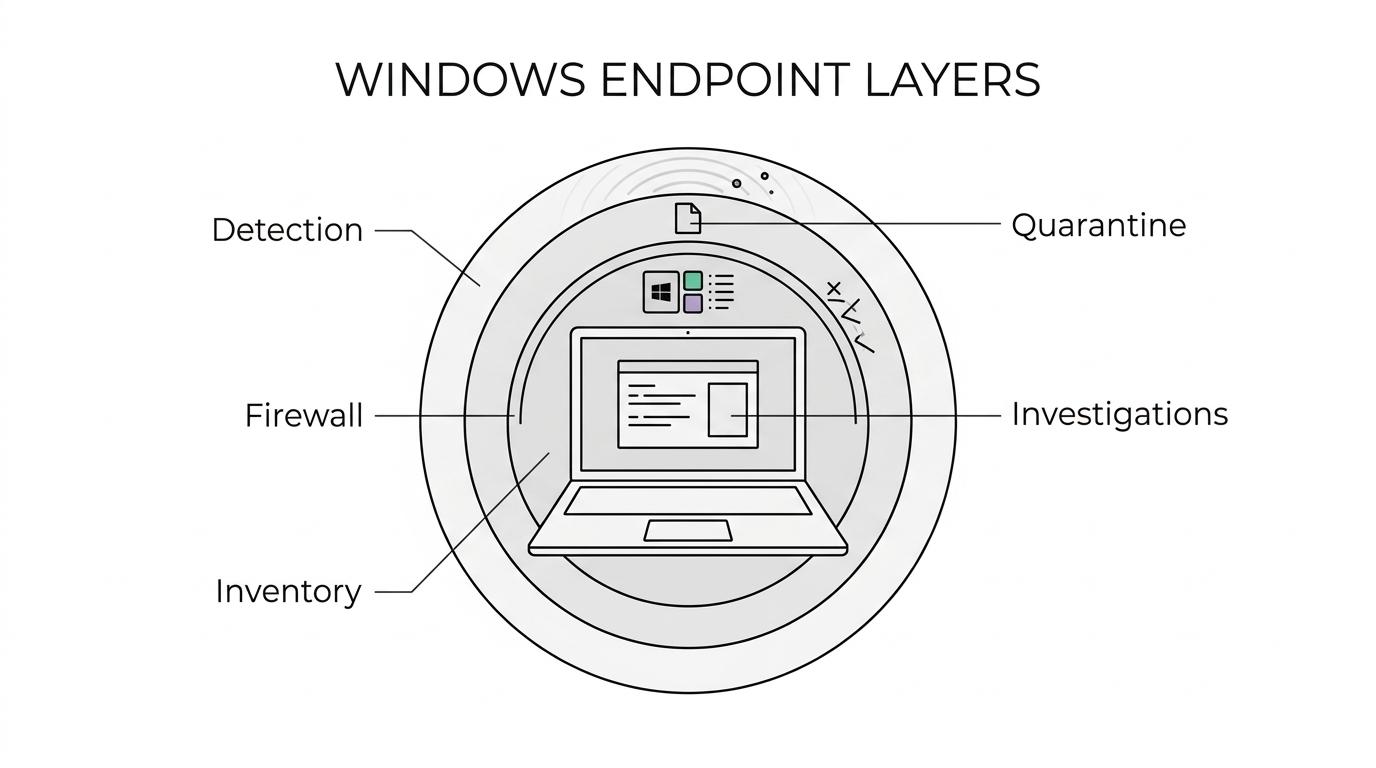
Then look at visibility and containment. Verizon’s 2026 DBIR says vulnerability exploitation is the top breach entry point, so teams need software inventory, patch awareness, and the ability to isolate or quarantine suspicious files and hosts quickly. If you cannot see what software is installed and active on a workstation, you cannot make good risk decisions.
“OctoWatch licenses active tracked users instead of computers, which is useful when Windows workstations and RDS sessions are shared.”
One practical tip: do not rank tools only by detection claims. IBM reports a 2026 global average breach cost of $4.99 million and says AI-driven attacks increased by 56%, which means investigation speed and operational clarity matter almost as much as initial prevention. A tool that alerts constantly but slows triage can create as much pain as a tool with weaker visibility.
What are the 10 endpoint security software options Windows teams should shortlist?
The right shortlist depends on whether you need pure endpoint protection, deeper response, or insider-risk and DLP controls on Windows. Most buyers should compare at least one Microsoft-native option, one EDR specialist, and one Windows-focused investigation or DLP platform.
Before you compare vendors, decide whether your main gap is malware defense, endpoint response, user activity evidence, device control, or all of the above. That one choice usually cuts a long list in half.
- OctoWatch: Best fit when a Windows team needs employee monitoring, DLP, screenshots, video recording, device control, time tracking, remote control, and investigation workflows in one system. It complements core antivirus or EDR rather than replacing them.
- Microsoft Defender for Endpoint: Strong fit for Microsoft-first environments that want deep Windows integration and a broad security ecosystem.
- CrowdStrike Falcon: Common shortlist choice for teams prioritizing cloud-managed EDR and response depth.
- SentinelOne Singularity: Often evaluated when automated detection and remediation are high priorities.
- Sophos Intercept X: Relevant for mid-market buyers looking for ransomware-focused prevention plus broader endpoint controls.
- Trend Micro endpoint offerings: Suitable for organizations comparing endpoint protection with wider platform coverage.
- Trellix Endpoint Security: Enterprise option for large fleets needing mature policy control and established endpoint-security workflows.
- VMware Carbon Black: Good benchmark for teams focused on behavioral analytics and threat hunting.
- Bitdefender GravityZone: Frequently considered for layered endpoint prevention with centralized administration.
- ESET PROTECT: Worth a look for teams that want broad endpoint coverage with relatively straightforward management.
The trade-off is simple. The more specialized the product, the more likely you are to need adjacent tools for DLP, device control, or insider-risk investigations. The more consolidated the platform, the more carefully you should validate depth in each control area.
How do you scope Windows endpoint security requirements step by step?
A clean scope starts with users, devices, data, and response obligations. If you skip any of those four, your shortlist will drift toward the wrong category.
After defining the business problem, walk through these steps:
- Step 1: User and device model: Identify office users, remote users, privileged admins, shared workstations, and RDS or Terminal Server sessions.
- Step 2: Risk and policy model: Map malware, phishing, vulnerability exploitation, removable media, unsanctioned software, and sensitive-data movement to concrete control needs.
- Step 3: Response model: Decide whether the team needs only alerts, or also quarantine, device control, user activity evidence, remote support, and formal investigation workflows.
If your main problem is malware prevention, your shortlist should lean EPP and EDR. If your main problem is data leakage or insider misuse on Windows endpoints, you need stronger DLP, user activity monitoring, and evidence collection. Many teams need both, but one side is usually dominant.
How do preventive controls compare with investigation controls?
Preventive controls try to stop bad activity before damage spreads, while investigation controls help reconstruct who did what, when, and how. Both matter because Windows incidents often begin in one category and end in the other.
Preventive controls include antivirus, behavior-based detection, host firewalls, macro blocking, and quarantine. Investigation controls include user activity logs, screenshots, video, file movement evidence, device-use records, and remote review. If a phishing payload is blocked, prevention did its job. If a user copied regulated data to removable media before a rule was tightened, you need investigation data.
A frequent buying mistake is assuming EDR alone answers insider-risk questions. EDR is excellent at process, file, and network telemetry for threat response. It is not always designed to provide the same depth of policy-oriented user evidence, time tracking context, or device-control workflow that operations, HR, compliance, or insider-risk teams may need.
How do you evaluate cloud versus on-premise endpoint security for Windows?
Cloud is usually faster to deploy, while on-premise fits stricter network and data-control requirements; OctoWatch is relevant here because it offers both deployment models with a centralized Web Console for Windows investigations and policy management.
Start with governance. If legal, compliance, or customer obligations restrict where endpoint evidence can reside, on-premise may be non-negotiable. If the team is distributed and wants fast rollout with less infrastructure overhead, cloud deployment usually wins.
Next, test operations. Ask how agents update, how policy changes are pushed, how evidence is stored, and how remote users behave off-network. Then validate administrator workflow. The best deployment model is the one your team can actually operate without creating blind spots or constant exceptions.
One pro tip: do not treat cloud versus on-premise as only a hosting question. It is also a staffing question. If your team lacks time for server maintenance, backups, and internal upgrades, an on-premise preference may look better on paper than in practice.
How do you pilot endpoint security software in a Windows environment step by step?
A useful pilot should prove operational fit, not just show a clean dashboard. You want evidence that the product can protect, contain, and explain activity across real Windows use cases.
Use a pilot plan that tests normal and adverse conditions:
- Pilot group: Include office staff, remote users, privileged users, and any shared-device or RDS workflows.
- Control tests: Validate malware detection, host firewall behavior, quarantine, device control, and software-visibility outputs.
- Investigation tests: Trigger a mock policy violation or suspicious action and measure how quickly the team can reconstruct the event.
- Admin review: Check console usability, false-positive handling, reporting clarity, and rollout effort.
If the pilot only proves that an agent installs successfully, it has not answered the buying question. You need to know whether the tool reduces real admin effort while improving oversight and response.
How is endpoint security different from employee monitoring and DLP?
Endpoint security and employee monitoring are not the same; OctoWatch sits in the overlap where Windows teams need DLP, device control, user activity evidence, and insider-risk investigations in addition to standard endpoint protection.
Classic endpoint security is centered on malware, exploit activity, endpoint hardening, and response. Employee monitoring and DLP are centered on user behavior, data movement, removable media, policy enforcement, and audit evidence. They intersect on Windows endpoints because both depend on agent-based visibility and policy control.
This distinction matters during procurement. If a buyer asks an EDR vendor to solve time tracking, screenshot-based investigations, or device-use governance, they may end up stretching the product beyond its strongest use case. If a buyer asks a monitoring tool to replace malware defense, they are making the opposite mistake.
Which Windows environments need special handling, including RDS and remote users?
RDS, Terminal Server, shared workstations, and remote laptops need extra planning because user identity, session context, and device ownership are less straightforward. A per-device view is often too shallow in these environments.
In RDS or Terminal Server environments, multiple user sessions can run on the same host. That changes how you think about attribution, policy enforcement, screenshots, and investigation evidence. You need user-aware visibility, not just machine-level events.
Remote users add another layer. They are more likely to operate outside the office network, connect to unmanaged peripherals, and delay patching or support interactions. A tool that looks strong on a LAN may be clumsy for remote response if it assumes constant internal connectivity.
A common misconception is that Windows endpoint security is easier on shared infrastructure because the number of machines is lower. In practice, shared infrastructure can increase complexity because one server or workstation may represent many users, policies, and investigations.
What buying mistakes cause Windows endpoint security projects to stall?
Most stalled projects fail on category mismatch, weak pilot design, or poor operational fit. The software may be capable, but it is solving the wrong problem or asking too much from the team running it.
One mistake is buying a single-control product when the real requirement is layered. NIST and CISA guidance both point toward layered host protections, so if your shortlist ignores host firewall control, quarantine, software visibility, or investigation workflow, you may be under-scoping the problem.
Another mistake is ignoring current attack patterns. If Verizon says vulnerability exploitation leads breach entry, and IBM says AI-driven attacks are rising fast, then Windows teams should ask tougher questions about patch exposure, behavioral detection, automation, and triage speed. If a product cannot help you find, contain, and explain host activity quickly, you may still be slow during a real event.
The last major mistake is forgetting the Windows admin reality. If the product struggles with RDS, remote support, shared endpoints, or policy exceptions, adoption will slip. Good endpoint security software should reduce uncertainty for IT, security, compliance, and operations teams, not create a second management problem they have to secure as well.