Endpoint DLP only works when it covers the place where people actually handle data. OctoWatch provides endpoint DLP and employee monitoring software for Windows, giving your IT, security, compliance, and operations teams direct control over what happens on workstations through a centralized Web Console.
If your environment includes office PCs, remote laptops, hybrid users, or Terminal Server / RDS sessions, OctoWatch is built for that Windows layer. You can run it in Cloud or On-Premise, apply policy rules from one console, and investigate insider risk or policy violations without stitching together separate tools for monitoring and data protection.
Windows endpoint DLP for workstations, laptops, and Terminal Server / RDS
Endpoint DLP is about protecting sensitive data where it is used, moved, copied, printed, uploaded, or shared on the endpoint itself. OctoWatch focuses on that Windows device layer so you can monitor and control data in use, data in motion, and data at rest on the workstations your team actually manages.
“OctoWatch supports Windows PCs and Terminal Server / RDS through one centralized Web Console.”
This matters because workstation activity is often where accidental sharing, policy bypasses, and insider misuse show up first. Verizon’s 2024 breach reporting said more than two-thirds of breaches involved a non-malicious human element, which makes endpoint visibility a practical control, not just a technical nice-to-have.
“IBM’s 2024 report put malicious insider breaches at USD 4.99 million; OctoWatch focuses controls at the Windows endpoint where those actions occur.”
OctoWatch combines endpoint DLP with detailed user activity monitoring, so you are not limited to simple time tracking or basic web filters. You can see what users did, what data channel was involved, and what rule or response should apply next.
OctoWatch endpoint coverage for Windows can include:
- User activity monitoring: application usage, website activity, screenshots, and video recording
- Data movement visibility: file operations, USB activity, print events, clipboard use, email, instant messaging, and network activity
- Investigation detail: keystroke logging, live view, and remote control for incident review and response
- Peripheral and channel monitoring: webcam, microphone, and other workstation-level signals relevant to policy enforcement
OctoWatch endpoint DLP rules help you enforce policy, not just observe risk
Seeing a risky action is useful. Stopping it, warning the user, or escalating it automatically is what turns endpoint DLP into a working control. OctoWatch lets you create DLP rules that can notify your team, show an on-screen message, block network traffic or file operations, terminate an application, clear the clipboard, log the user out, shut down the PC, or run a command or PowerShell script.
“OctoWatch says saved Rules profile changes usually take effect within about five minutes.”
That gives your team room to match the response to the risk. You can use light-touch user messaging for policy reminders, stronger enforcement for repeated violations, and automated containment for high-risk events without waiting for a separate workflow outside the endpoint platform.
When a rule is triggered, OctoWatch can surface the event in the Risks tab and send email notifications when configured. That makes it easier for security, compliance, and management teams to move from alert to review with the workstation evidence already tied to the incident.
OctoWatch combines endpoint DLP and employee monitoring for faster investigations
A DLP alert without context often creates more work than clarity. OctoWatch gives you the enforcement side and the investigation side in one Windows-focused system, which is especially useful when you need to confirm intent, scope, and sequence before you act.
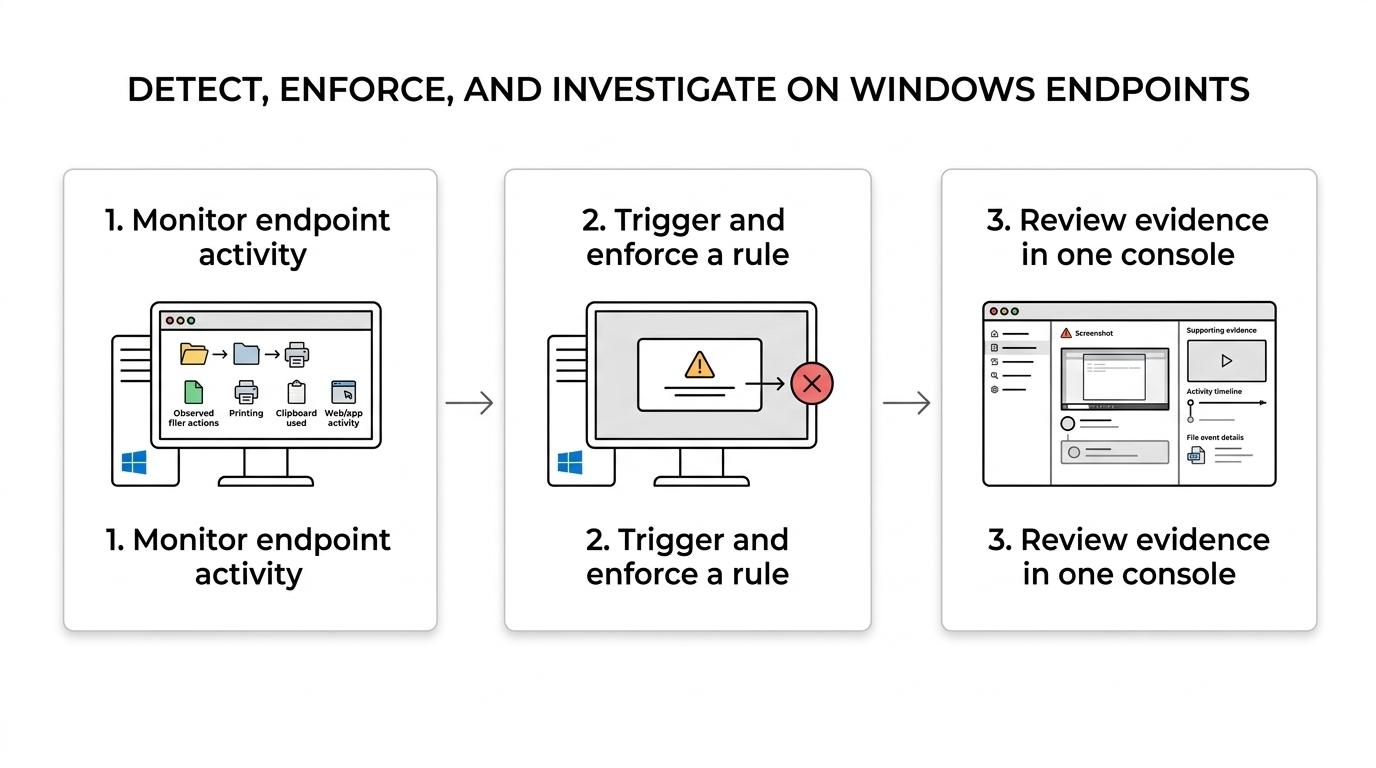
With OctoWatch, you can review recordings, screenshots, application activity, website history, file events, and other endpoint evidence from the same platform used to apply rules. For insider risk, HR-sensitive reviews, or regulated environments, that means fewer gaps between detection and documented follow-up.
OctoWatch also helps when the issue is not malicious. If a user copied data to the clipboard, sent a file through an unapproved channel, or printed something they should not have, your team can verify what happened and adjust policy, training, or enforcement based on facts instead of assumptions.
Cloud and On-Premise endpoint DLP deployment for regulated Windows environments
OctoWatch gives you two deployment paths because endpoint DLP requirements vary by organization. In Cloud, OctoWatch uses a Grabber plus a hosted Web Console, which is a practical option when you want faster evaluation and less infrastructure to stand up first.
On-Premise, OctoWatch keeps the Server and Microsoft SQL on your network. That matters when internal hosting, tighter infrastructure control, or regulated handling requirements are part of the buying decision.
The benefit is consistency. OctoWatch keeps the same core workflow idea across Cloud and On-Premise, so your team does not have to choose between ease of use and deployment control.
OctoWatch also uses floating licenses by active tracked users. For many organizations, that creates a cleaner way to align licensing with real usage instead of paying for permanently assigned seats that are not always active.
OctoWatch is a strong fit for IT, security, compliance, and operations teams managing Windows endpoints
OctoWatch is built for teams that need more than basic employee oversight. If your responsibility includes protecting sensitive information on Windows devices, enforcing acceptable-use or handling rules, and investigating suspicious workstation behavior, the product is aligned with that job.
OctoWatch is especially relevant when your environment includes:
- Windows-first endpoints: desktops, laptops, and user sessions that run on Windows rather than mixed OS fleets
- Terminal Server / RDS use cases: shared environments where session-level visibility and control matter
- Remote or hybrid workforces: users working outside the office but still handling sensitive data on managed Windows devices
- Regulated or data-sensitive operations: teams that need endpoint evidence, configurable responses, and deployment choice
OctoWatch is not the best match if your priority is Mac or Linux coverage. The platform is intentionally Windows-focused, and that specialization is part of why it fits organizations that want deeper endpoint control on Windows PCs and RDS rather than broad but lighter cross-platform coverage.
Why organizations choose OctoWatch for Windows endpoint DLP
OctoWatch stands out because it treats endpoint DLP as an operational control, not just a reporting feature. You can monitor workstation behavior, apply rules, review risks, investigate incidents, and manage productivity from a centralized Web Console instead of splitting those tasks across unrelated systems.
That focus also shows up in the product design. OctoWatch supports both Cloud and On-Premise deployment, covers Terminal Server / RDS, and pairs DLP enforcement with activity evidence such as screenshots, video, application tracking, and device-level monitoring.
For buyers comparing options, the practical difference is this: OctoWatch is designed for organizations that need to control what happens on Windows endpoints with enough detail to act on it.
Talk with OctoWatch about endpoint DLP for your Windows workstations
If you need endpoint DLP for Windows laptops, desktops, or Terminal Server / RDS, OctoWatch gives you a direct way to enforce policy at the workstation layer and investigate what happened when a rule is triggered.
Talk with OctoWatch about your Windows environment, your deployment preference, and the controls you need around file handling, clipboard use, USB activity, printing, network traffic, and user behavior. If the goal is clearer endpoint oversight with stronger data protection on Windows, this is the right place to start.