If you need workforce analytics for Windows desktops, the question is not whether you can collect more data. It is whether your team can turn desktop activity into usable oversight, enforce policies from the same system, and investigate issues without stitching together multiple tools.
OctoWatch is built for that job. We provide Windows-focused workforce analytics that combines employee monitoring and data loss prevention in one platform, with a centralized Web Console, Cloud and On Premise deployment options, and support for both standard Windows workstations and Terminal Server/RDS environments.
Workforce analytics for Windows desktops, RDS, and hybrid teams
OctoWatch helps IT, security, operations, compliance, and management teams understand what is happening on Windows endpoints in day-to-day work. That includes application and website activity, active and idle time, screenshots, video recording, user activity monitoring, time tracking, remote control, and device control from one Windows-oriented system.
This matters when your workforce is split across office, home, and hybrid schedules. BLS 2025 data show that 34.5% of employed people worked at home on days worked, so desktop-level visibility is still operationally relevant even when most staff also spend time on site. OctoWatch gives you the same activity picture across those work patterns through its Windows agent and centralized Web Console.
“OctoWatch has developed Windows employee monitoring and DLP software since 2016.”
Unlike workforce analytics tools built mainly around timesheets or communications data, OctoWatch is centered on desktop activity review for Windows environments. You can see which applications are used, which websites are opened, how long users stay active or idle, and what happened on screen when you need evidence for an HR, security, or operational review.
OctoWatch combines workforce analytics and DLP in one Windows platform
Many teams do not just need visibility. They also need controls. OctoWatch combines workforce analytics with endpoint DLP and policy enforcement, so you can move from observing behavior to reducing risk without adding a second product.
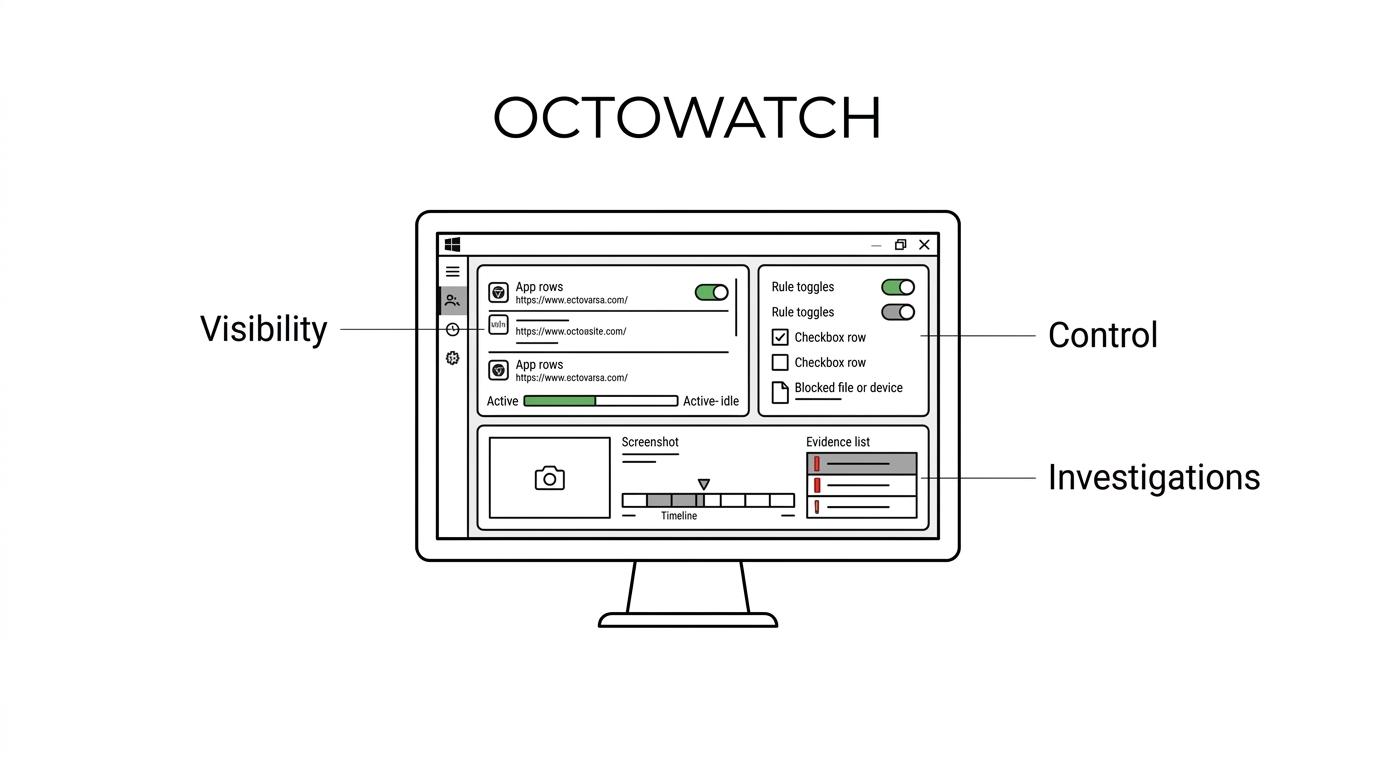
That is especially useful when desktop analytics is part of a wider insider risk or compliance program. CISA notes that organizations of all sizes are vulnerable to insider threat, and practical response requires more than a usage dashboard. OctoWatch gives Windows teams activity records, screenshots, video capture, device control, and investigation workflows in one place, which makes it easier to review suspicious behavior, validate policy violations, and document what happened.
“OctoWatch uses one Grabber agent and one Web Console for activity logging, investigations, and policy enforcement.”
For compliance-minded buyers, useful workforce analytics also needs the right level of event detail. Security logging guidance often points to records such as timestamps, user or process identifiers, event descriptions, file names, and rule context. OctoWatch is designed around centralized activity logging and policy management, so your desktop monitoring program can support audits, internal reviews, and incident follow-up instead of producing disconnected snapshots.
Here are some of the questions OctoWatch can help you answer on Windows endpoints:
- Which applications, websites, URLs, and window titles are consuming working time?
- Which users were active, idle, or interacting with sensitive systems during a review period?
- What happened on screen before, during, and after a policy breach or suspected data handling issue?
Windows desktop analytics that support remote, office, and Terminal Server/RDS operations
OctoWatch is a strong fit when your environment is Windows-heavy and not limited to one workstation model. We support standard desktops as well as Terminal Server/RDS environments, which matters for organizations that centralize Windows sessions or run shared infrastructure for specific teams.
OctoWatch also fits hybrid operations where activity visibility needs to stay consistent regardless of location. The same platform can be used for office days, home days, and hybrid schedules, and recurring exports in Reports & Analytics can be used for weekly workforce snapshots or recurring management reviews.
“OctoWatch provides the same activity picture for office days, home days, and hybrid schedules through its Windows Grabber and Web Console.”
Because remote work is not a separate edge case anymore, desktop analytics has to work without changing your process every time someone works off site. With OctoWatch, the workflows for monitoring, policy checks, and review stay centralized, which reduces administrative friction for distributed Windows teams.
OctoWatch Web Console turns raw activity data into usable workforce analytics
A workforce analytics tool is only useful if your team can work through findings quickly. OctoWatch uses a centralized Web Console for monitoring, rules, investigations, and reporting, which gives administrators one place to review endpoint behavior and apply policy decisions.
For Windows activity analysis, OctoWatch includes concrete views and reports rather than a vague “productivity score.” Depending on the use case, your team can work with Activity, Chronometry, Search queries, Overview top-10, Reports & Analytics, and Productivity Analytics. Application and website monitoring can record app names, window titles, URLs, active and idle time, and search-engine queries when enabled.
That structure helps different stakeholders answer different questions without changing products. IT can review usage and support issues, security can investigate suspicious behavior, operations can understand work patterns, and management can use recurring exports for scheduled oversight.
OctoWatch also adds practical operational tools around analytics. Remote control supports direct review and assistance on Windows endpoints, while screenshots and video recording give investigators clearer context than timing data alone.
Cloud or On Premise workforce analytics for Windows security and compliance requirements
Deployment model matters when workforce analytics touches employee activity, security policy, and regulated data handling. OctoWatch is available in both Cloud deployment and On Premise deployments, with a similar workflow across both options, so you do not have to choose between usability and hosting preference.
That gives your team flexibility when internal policy, data handling requirements, or infrastructure strategy affect software selection. If you want a faster rollout, Cloud deployment is available. If you need tighter internal control over hosting, On Premise is also supported.
Licensing is also practical for organizations with changing activity levels. OctoWatch uses floating licenses based on active tracked users, which can be a better fit for shift-based teams, shared workstation environments, and organizations that do not want to pay for every named user regardless of actual monitoring activity.
“OctoWatch offers a free 14-day trial and floating licenses based on active tracked users.”
For buyers comparing workforce analytics tools, that means you can test the platform in your real Windows environment before a longer commitment. It also means licensing maps more closely to actual tracked usage than rigid per-seat models.
Where OctoWatch fits best for workforce analytics
OctoWatch is the right fit when your workforce analytics needs are tied to Windows desktop visibility, security oversight, and enforceable policy controls rather than generic people analytics.
Teams typically choose OctoWatch when they need one or more of the following:
- Windows-first monitoring: Your users work on Windows desktops, laptops, or Terminal Server/RDS sessions, and you need endpoint-level activity review.
- Security plus operations: You want workforce analytics and DLP in one platform instead of separate tools for monitoring, device control, and investigations.
- Hybrid oversight: You need the same monitoring workflow across office, remote, and mixed work arrangements.
- Investigation support: Screenshots, video, user activity records, and centralized logging matter for insider risk reviews, policy enforcement, or audit response.
- Flexible deployment: Your organization needs Cloud or On Premise options and wants to evaluate the same core workflow either way.
If you mainly need payroll processing, phone-system analytics, or a broad HR performance suite, OctoWatch is probably not the tool you are looking for. If you need desktop-centric workforce analytics for Windows with policy enforcement and investigation depth, it is a much closer match.
Start evaluating OctoWatch on your Windows desktops
If you are comparing workforce analytics software for Windows, the fastest way to judge fit is to see how the platform handles your real endpoints, users, and review workflows. OctoWatch offers a free 14-day trial, so you can test monitoring coverage, reporting views, DLP controls, and administration from the Web Console in your own environment.
Use that trial to answer the questions that matter most to your team: what you can actually see on Windows desktops, how quickly you can investigate a case, and whether one platform can replace separate monitoring and DLP tools. When you are ready, start a trial with OctoWatch and evaluate workforce analytics in the environment you actually manage.